One of the main purposes of implementing an AP solution like Rillion is to automate the account coding and process flows, as well as improve their accuracy. Various types of invoices are processed using different matching methods. The highest level of automation can be achieved by matching invoices to purchase orders or contracts; however, there will still be invoices that cannot be matched in this way, we will refer to them as Cost invoices.
Many of the cost invoices may be processed using Rillion AI. Additional information regarding account coding and workflows with the AI can be found in the Getting Started Guides: AI – Account Coding & Workflows.
This guide provides instructions for configuring automation of Cost invoices not handled by AI - referred to as Reference Matching - although it involves more values than just references in the logic.
What is Reference Matching?
Reference matching is a template-based configuration in Rillion Prime that an organization maintains themselves. It is to set up different types of rules to assign workflow and account coding proposals automatically to incoming invoices
Why Choose Reference Matching over AI?
While AI-based account coding and flows is the recommended best practice in Rillion Prime there are scenarios where reference matching (template-based configuration) may be the more effective solution.
Here’s why template-based processes using account coding and flow proposals might be preferable in certain cases:
- Consistency & Predictability: Predefined templates ensure stable, repeatable results that align with your organization’s rules.
- Customization & Control: Easily tailor templates to fit unique business needs and compliance requirements, with full control over coding logic.
- Simplicity: For those who prefer straightforward setups, template-based coding is easy to manage and reduces reliance on advanced technology.
For organizations prioritizing control, consistency, and simplicity, template-based coding can be the preferred choice. AI features, on the other hand, are best for those seeking automation and long-term scalability. Most of Rillion’s customers use both methods to drive higher levels of AP automation.
Start with the most common scenarios
All companies have different types of invoices, account coding structures, and approval hierarchies. Some invoices will follow a standard process while others will be more complex and specific. In our experience, focusing on the most common scenarios first will give a great platform to start with.
How Flows Are Created in Rillion
Flows determine who approves invoices or requisitions in Rillion. There are several ways to set up these flows, each suited for different needs:
- AI-Generated Flows: The system suggests approval flows based on historical data. Best used after the system has been in use for a while, and patterns are established.
- Flow Proposals: Use templates to define part or full approval flow. Ideal for standard, repeatable processes.
- Dynamic Flows: Build templates by automatically adjusting the flow based on account coding. Recommended when coding details drive the approval process.
- Rule-Based Flow Auxiliary: Add roles to a flow based on specific actions (like pre- or post-invoice controls). Useful for enforcing compliance or special approval rules.
Key Setup recommendations:
- Use consistent naming Convention of roles, flow proposals, and references (e.g., “Marketing Manager”) to enable automation and reduce manual setup.
- Each role should have its own flow proposal, and a connected manager role for escalations (e.g., when higher authorization is needed, or the four-eye principle applies).
- Flow proposals can be fixed or dynamic, adapting to amounts, coding, or variances
By choosing the right method and following the recommended naming conventions, you can automate approvals efficiently and ensure compliance with your organization’s policies.
How Account Coding’s Are Created in Rillion
Account posting proposal determines how an invoice is to be booked/coded when it’s recorded in the ERP. There are several ways to get a coding proposal for an invoice, each suited for different needs:
Account coding proposal
An Account Coding Proposal is a template with a predefined set of coding lines that can be applied to invoices to automate and standardize cost-allocation.
It is best used for recurring invoices or when costs need to be split across multiple accounts, departments, or cost centers according to company rules. Templates can contain one line for simple allocations or several lines for more complex distributions. Each line can be based on a fixed amount for predictable costs or a percentage for proportional allocation, such as dividing expenses between departments. These percentages can follow distribution keys like headcount, revenue share, or square meters. Using templates improves efficiency by reducing manual work, ensures accuracy and compliance with internal policies, and provides flexibility for handling both simple and complex invoices.
GL Account on Vendor Card
To streamline account coding, consider identifying a default account for each vendor. In many cases, vendor invoices are coded to the same general ledger (GL) account with little variation.
Review your vendors and assign a default account where appropriate.
This process can typically be set up in the ERP system for integration with Rillion.
Captured values
Using key reference values like project numbers or locations improves coding accuracy. These can connect directly to Rillion entries or via alias mappings. Vendors should provide clear references for invoices to help automate and speed up coding and invoice processing.
Default values
A dimension can be linked to another relevant dimension, activated at both the company and Account Coding Proposal levels. This feature streamlines invoice coding: for example, if a project number (tied to a specific Cost Center) is referenced on an invoice, Rillion can automatically assign the Project number and its default Cost Center during coding.
Let’s create your first rules
Flow proposal – A recommended approach is to assign a standard flow to each role, with the flow proposal named according to the role. The flow should specify all the roles that are consistently required to review the invoice, regardless of its amount or coding.
Within the flow proposal, you may also define rules for assigning roles based on authorization criteria. It is recommended to select the "Manager Role" option to further build the flow. The Manager Role is determined from the last role in the established flow.
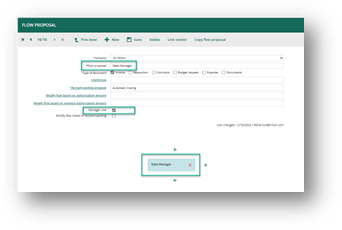
If the manager is not the next role to be included in the workflow, several methods are available to establish the process:
- Create a fixed workflow with predefined roles at each level within the proposal. This approach is typically used for highly specific invoices and workflows. For example, IT related cost should always be approved by the roles “ABC” and “DEF”.
- Modify flow based on authorization amount: In this case, a particular role—often not the manager—can be designated to join the workflow depending on the amount involved.
- Modify flow based on account posting: Here, the workflow is dynamically structured based on the account coding of the invoice. This method is known as Dynamic Flow, which is discussed in greater detail later in this document.
- Adjust the flow using Rule Based Flow Auxiliary: This function allows you to establish rules for adding a Role to the Flow based on criteria such as Vendor, Amount, Coding Dimension, invoice type, and more. While this feature is primarily designed for pre- and post-control of specific invoices, it can also be applied to other types of rules.
For more information on how to create a Flow Proposal follow the step-by-step guide Admin - How to create a flow proposal in Rillion Prime
Account Posting proposal
When creating Account Coding Proposals, try to make them as adaptable as possible to encourage reusability.
We recommend creating:
- Standard Account Coding Proposal – Contains a single line with a dummy or preliminary booking account. This is used when no other proposal is found.
- General Proposal – Often named Automatic Coding, this pulls most values from other parts of the system. For example, the GL account may come from the Vendor Card, and the Cost Center or Project from a reference field.
- Distribution Proposals – Allocate costs across all or selected departments or objects using fixed percentages. Ideal for shared expenses like office costs that need to be split among departments or cost centers.
- Specific Proposals – Designed for specific invoices, these include a set of GL accounts, objects, and distribution. Use them only when such detailed coding is necessary
Examples of Account Coding Proposals and how to set them up.
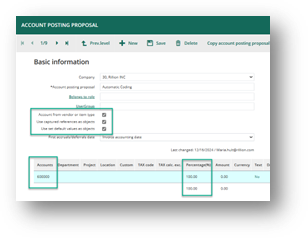
General Proposal /Automatic Coding:
- Select a proposal name indicating that it can be used in a a general way, example “Automatic Coding...”, “Default coding”.
- Select from where the value of the coding is to be fetched – Account from Vendor, Use Captured Reference as Object, Use Set Default values as Objects.
- Create one line with a dummy account/preliminary booked invoices account.
For more information on how to set up and work with Default values and Captured Reference to generate the account coding follow the step-by-step guide Admin - How to use Default values and Captured Reference to generate the Account Coding
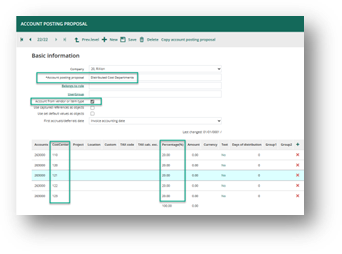
Distribution Proposals:
- Assign a name to the proposal that reflects the template's purpose and is general enough for future use, such as "Distributed Cost Department".
- Add the required number of lines for each department, along with the corresponding percentages.
- To save time, try to reuse templates for different types of invoices, using the “Account from Vendor” option, which retrieves the cost account from the vendor card and replaces it with the one specified on the template.
“Specific” Proposals:
- Name the proposal to show its purpose, e.g. “Leasing cost Copier” or “Electricity cost Building A”. The name may also indicate what the proposal provides, such as the account and dimensions, 6550-300-1400.
- Specify the required number of coding lines.
- Include fixed amounts when applicable.
- Always add at least one line with a percentage; all % lines must total 100%.
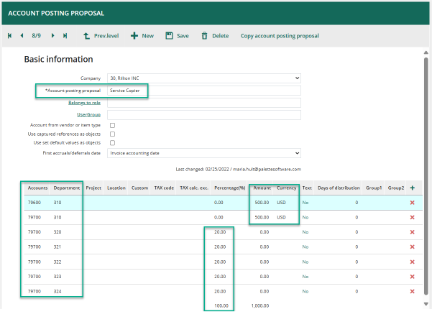
For more information on how to create an Account Posting Proposal follow the step-by-step guide Administration - How to create an account posting proposal in Rillion Prime
Dynamic Flows
Dynamic Flows in Rillion automate invoice approvals by adapting in real time to account coding dimensions and authorization limits. Unlike static templates or manager-based flows, Dynamic Flows are best for situations with complex or variable approval needs.
Use Dynamic Flows when:
- Approval routing depends on coding details (e.g., project, cost center).
- Roles and authorization limits vary frequently.
- You need flexible, real-time assignments of approvers.
When to Avoid Dynamic Flows
- When you need manager role support (for escalation or four-eye principles), use Flow Proposals instead.
- For simple, stable approval processes, template-based Flow Proposals or Reference Matching are more efficient.
- If you want full manual control and customization, static flows or AI matching are better options.
Create a Dynamic Flow Rule:
- In dynamic flow rules, accounts and/or objects are specified to trigger the addition of certain roles to the invoice flow when related postings occur on the invoice.
- Add the Roles that should be used
- Add an Authorization amount that will be used to trigger the next level of the flow.
- The amount assigned at each level serves as the authorization amount for the added role in the created flow for the Invoice.
- Limit Flow: Only the role with sufficient authorization will be added to the flow under the triggered dynamic flow rule, or all roles in the triggered dynamic flow rule will be included until a role with enough authorization amount is present. The setting "Limit the Flow" enables adding only the role with adequate authorization.
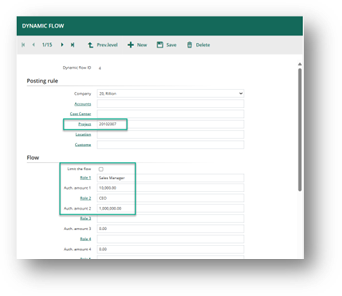
Dynamic flow rules can be set up manually in the application or imported using XML file format or Prime Web Service.
If multiple dimensions are used in Dynamic Flow rules, it is advisable to add a Dynamic Flow Priority on the Company. Specify which dimensions should receive higher priority if Rillion encounters conflicting rules.
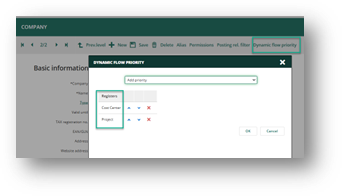
For more information on how to set up Dynamic Flows follow the step-by-step guide Administration - Create a Dynamic Flow Rule in Rillion Prime
References
What are References Used For?
References in Rillion Prime are identifiers that help automate invoice processing and ensure correct flow proposals and account coding are being used. They are typically values provided by the vendor on the invoice, such as:
- Project number
- Property registration number
- Recipient name
- Profit center or department code
Key purposes:
- Match invoices to the right flow proposal or coding rules.
- Automate dimension settings (e.g., cost center, department) for invoices.
- Improve accuracy and speed in invoice handling
Create a New Reference:
- Enter the reference name. It is recommended that each Role/Flow has a Reference set up with the same name. The easiest way to get that is to click the “Reference”, then you can search on the Flow Proposals created, select one to get the same name.
- Assign type (Type 1, Type 2, or both), which indicates where values will appear on the invoice. Reference 1 may capture a name (Type 1), and Reference 2 may capture a project number (Type 2).
If you are unsure about what type of Reference a value should be, use both 1 and 2.
- Add Default values.
If linked to dimensions (like cost center), these can be auto populated during coding for invoices marked with that reference.
- Add aliases to get more flexibility. Go with what will be captured as a reference on the Invoice Image.
You can define unlimited aliases for a reference, as long as they are unique and not used for another reference (e.g., variations of project numbers or names). These aliases are treated as equivalent during matching.
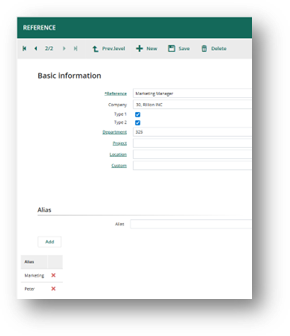
Expert tip: “did you know you can add new aliases directly from the invoice log?”
If the reference value you have captured does not exist in the system, look up the correct Reference for the invoice. A prompt will appear asking whether you would like to add the captured value as an alias for the selected reference.
For more information on how to create a Reference follow the step-by-step guide Administration – How to add a reference in Rillion Prime
Reference matching
Reference matching refers to two different things. First, it describes the logic within Rillion that determines the appropriate workflow and account coding for an invoice when it arrives. Second, reference matching is also part of the administrative process, where you can set specific rules for this function.
This chapter will describe the administrative process and how to create those rules.
How Reference Matching Determines Flow and Coding Proposals
When an invoice is processed, Rillion uses a specific order of priority to determine which Flow Proposal and Account Coding Proposal to apply:
For Flow Proposals:
- The Flow Proposal defined directly in the Reference Matching configuration is used first.
- If not found, the system checks if Reference 1 or Reference 2 on the invoice matches the name of an existing Flow Proposal.
- If neither of the above applies, the Standard Flow Proposal that is set on the Vendor will be used.
For Account Coding Proposals:
- The Account Coding Proposal specified in the Reference Matching configuration takes priority.
- If not available, the system uses the Account Coding Proposal associated with the Flow Proposal selected for the invoice.
This prioritization ensures that the most specific and relevant rules are applied. This will help to streamline automation and maintain compliance with your organization’s policies.
Reference Matching Rules are maintained under Administration – Invoice – Reference Matching
Rules can be set using Company, Amount, Vendor, Reference 1, and Reference 2, following this order of priority. When multiple rules apply, the rule with the highest number of matched values and the highest priority will be chosen.
A Reference Matching Proposal should be set up when you require consistent processes that adhere to specified rules, and you want full control over approval and coding procedures. For example, if IT-related expenses must always be distributed according to a fixed percentage and approved by both the Office Manager and IT Manager—regardless of amounts or references, then a Reference Matching Rule is appropriate.
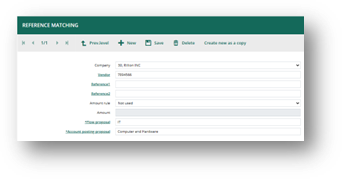
For more information on how to create a Reference Matching Rule follow the step-by-step guide Administration – Create Reference Match rules in Rillion Prime
Reports and Insights
For effective follow-up and comprehensive insights into the Administration of Reference matching, users can export multiple registers to Excel. Additionally, several reports are available to support analysis.
Administration – Role overview and Export to excel - will show the Manager role and general Authorization Amount
Flow Proposal – Export to excel – Shows the connection between Flow proposal and Account Coding proposal and all Roles that are included in the flows
Account Posting Proposal – Export to excel – Shows all proposal templates created and how they are distributed over Accounts and Dimensions
Dynamic Flow – Overview and Export to Excel to get out the details regarding the flow rules
Report – Role overview. This report lists all Roles in the system based on your selection. The report is great to use when inactivating Roles or making changes to the approval structure
Analytics
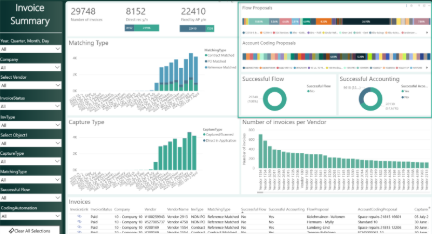
The Invoice Summary view provides key details, including Flow Proposals and Account Coding Proposals related to Reference Matching. You can examine which proposals were applied to specific vendors or identify those with high success rates, indicating that no changes were needed during processing. Utilize this view to identify unsuccessful flow proposals and account coding suggestions, and assess whether modifications to these flows may enhance the overall process.
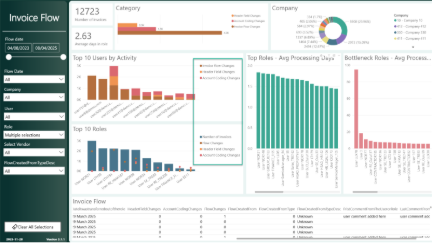
The Invoice Flow view offers a clear summary of each step in the process and highlights any changes required by the approver. It allows you to see how frequently a particular role or user modifies the Account Coding or the Invoice Flow. You can identify bottlenecks processes, observe actions taken, and investigate their causes. This provides valuable insights for actions needed to make improvements.
To learn more, check out our two step-by-step guides that show you how to use the analytics module to assess your automation and efficiency.
Analytics View Successful Flows
Analytics View Successful Account Coding
Concluding remarks
Congratulations on reaching the end of this guide on Reference Matching and AP automation in Rillion!
Throughout this document, we have explored the key concepts and practical steps for automating invoice processing using both AI-driven and template-based approaches. You have learned:
- The differences between AI-based account coding and reference matching, and when to use each method for maximum efficiency and control.
- How to configure approval flows and account coding proposals, including dynamic flows, distribution proposals, and specific templates for recurring or complex invoices.
- The importance of references in automating invoice handling, and how to set up and manage reference matching rules for consistent and compliant processes.
- How Rillion prioritizes rules and proposals to ensure the right workflow and coding are applied to every invoice.
- Where to find reports and analytics to monitor, analyze, and continuously improve your automation setup.
By following these best practices, you are now equipped to streamline your AP processes, reduce manual work, and increase accuracy and compliance within your organization. Remember, automation is a journey—start with the most common scenarios, refine your rules as you go, and leverage analytics to identify opportunities for further improvement.
Best of luck as you continue to optimize and automate your accounts payable workflows with Rillion. Your efforts will drive efficiency, transparency, and value for your entire organization!