
Introduction
For organizations seeking to prevent unauthorized or unbudgeted spend, using a system that supports a requisition process is a proven and highly effective strategy.
Requiring a formal approval before a purchase is made significantly reduces the risk of uncontrolled spend. A common challenge arises when managers are presented with a completed purchase — at which point it’s often too late to intervene.
Getting control over purchasing doesn’t have to be complicated. Even a simple free-text requisition form can make a big difference. Overly complex processes often fail because they meet internal resistance.
To simplify purchasing and maintain control over authorization levels, Rillion Buyer provides robust support for managing requisitions efficiently.
This guide will help you streamline your work in Buyer and adopt best practices for your purchasing process.
Process
A few things first
The Buyer module is an add-on product that requires a separate subscription and is not part of any package. Contact your Customer Success Manager for more details.
Activation
Both activation and configuration are done via a project by Rillion Professional Services. The implementation project will be to set up the base and then the organization can continue to roll out.
Free-text requisitions
A great way to start using Rillion Buyer is through free-text requisitions.
This feature is simple to use, quick to learn, and requires minimal configuration. We recommend starting with a pilot project by following the steps below.
Before getting started
1. Ensure Management Support
Implementing a requisition-based purchasing process is primarily a business process change, not an IT implementation project.
Some internal resistance is natural, so it’s crucial to have management buy-in and strong “ambassadors” in place promoting the new way of working before you begin.
2. Select a Pilot Area
Start where you have a strong business case — for example, a purchase category that suffers from frequent maverick spend (purchases made outside policy).
3. Define Item Categories (Item Types in Rillion)
Even when using free-text requisitions, it’s recommended to have a few different Item Types rather than just one generic option. Example of Item Types could be Direct or Indirect Material, Services, Utilities, Marketing, Other Expense, Inventory and CapEX.
Best practise is also that the General Ledger Account are set based on the Item Type, so keep also the Account coding plan in mind when creating the Item types.
This step-by step guide provides instructions to Set up Item Type and update Vendor card
4. Choose Vendors
Identify your preferred vendors and link them to your Item Types.
For greater flexibility during setup, you may also include a “dummy vendor” — a placeholder used when the vendor is not yet known.
This is particularly useful in situations such as RFQs (Requests for Quotation), where you may know the estimated cost but have not yet selected a vendor.
5. Set Up Approval Flows and Permissions
Decide which roles will be part of the approval process. This can be manager-based or involve a procurement role if applicable. Flow can be both a financial flow (manager, approval of amount and coding) but also a more “functional” flow, meaning that we might want to add roles to complete, verify, and comment on the request. The “functional” roles can be added before the financial flow or in the end, based on need.
Ensure each role has the correct permission group in the application. Test the flow to verify.
6. Define Minimum Threshold
It might not be practical to create a requisition for very small purchases.
Decide on a reasonable minimum threshold for when a requisition is required.
7. Set clear Goals
Define clear goals for what the project should deliver — including expected cost reductions, or process efficiencies.
To accelerate value realization, it’s recommended to conduct a spend analysis to identify the categories and vendors with the highest potential for savings.
8. Stay resilient
Implementing Rillion Buyer is, above all, a change management initiative — supporting the organization to adopt a new way of working.
That’s why it’s essential to have a realistic and flexible timeline that allows people to adjust, learn, and stay committed over time.
Being resilient means staying focused on the long-term benefits even when early challenges arise.
Purchase orders
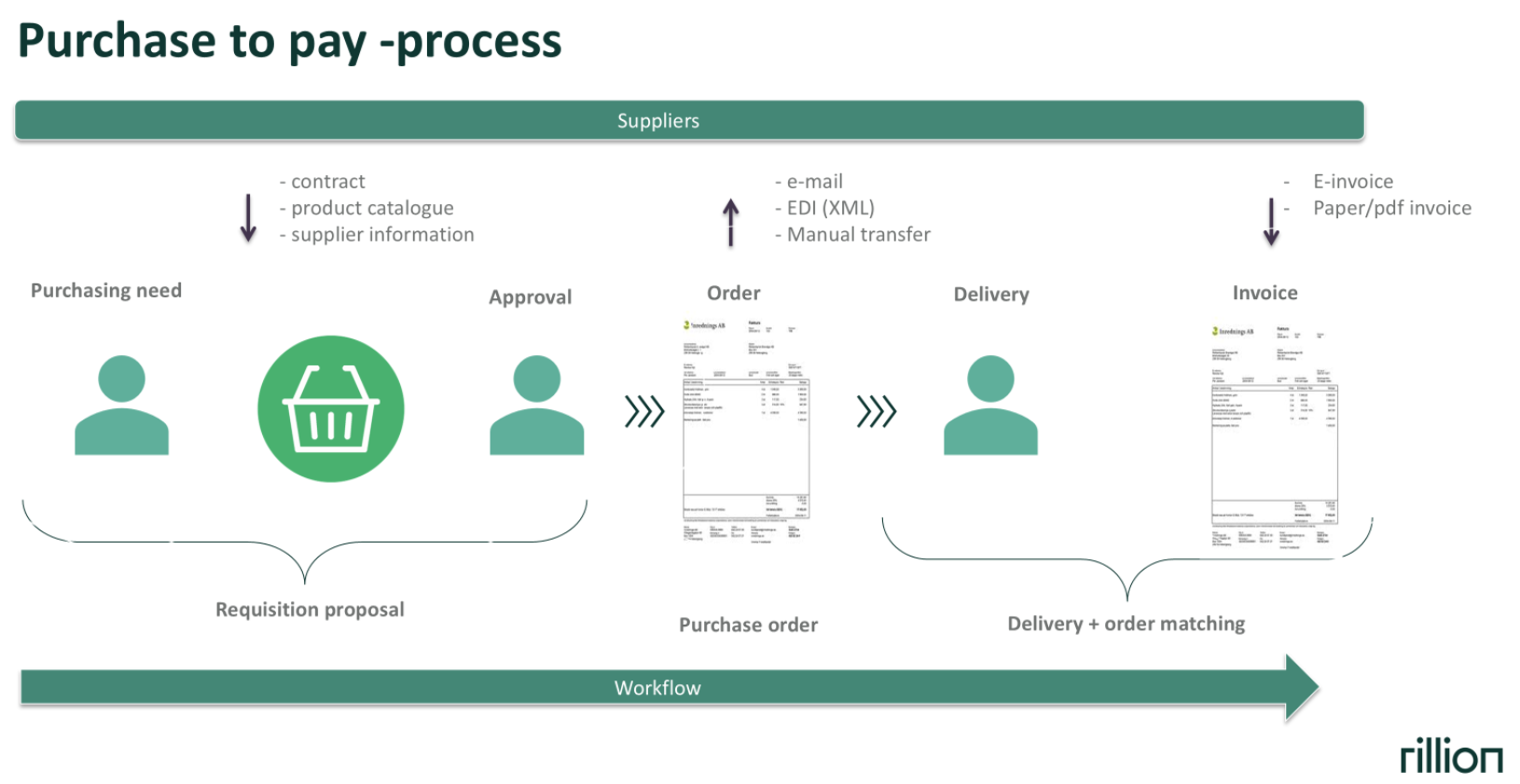
After a requisition is approved, Rillion Buyer automatically creates a Purchase Order (PO), which can then be sent to the vendor via email. Orders can be sent to vendors manually or automatically. These settings are set on the Vendor Card making it flexible for each vendor.
Delivery
In the order process, there is also a step for delivery, to make sure the organization receives what was ordered. This is not as common for indirect purchases and service orders as for purchase of direct material and is therefore not a mandatory step in Buyer. On the Vendor Card you can decide if delivery registration is needed or not (Automatic delivery).
Invoice matching
If the incoming invoice matches the order amount, it will be automatically matched in Rillion’s Invoice Log.
Since approval was already granted at the requisition stage, this saves time and ensures quality and compliance in your approval process.
Scaling up after first phase
Once your initial rollout is running smoothly, you’re ready to scale up.
Choose the next area for onboarding, ideally based on a strong business case or high purchase volume.
Step-by-step guide
See the detailed step-by-step guide here Create a free text requisition
Internal catalogue
Another effective way to get started with Rillion Buyer is by setting up an internal catalogue for commonly purchased items such as laptops, mobile phones, or office equipment.
The catalogue can be generic, where users simply search for what they need, or it can be organized into categories such as Office Supplies, IT Equipment, and more.
Keep the structure simple — the easier the catalogue is; the more likely employees are to follow the purchasing process.
The interface is user-friendly and works similarly to an online shop — users simply browse, add items to their cart, and check out.
Rillion Buyer automatically creates the approval flow, including roles for the financial approval, can be the manager or based on other rules, and if applicable, the functional/advisory role, like the IT department or other roles .
Orders can be sent to vendors manually or automatically. These settings are set on the Vendor Card making it flexible for each vendor.
Step-by-step guide
See the instructions for setting up here Create a catalogue item and make a requisition
Level up, unlock more value
For vendors that support Punchout integrations you can connect their online store directly to Rillion Buyer.
Please contact Rillion Professional Services for assistance with setup and configuration.
Report and Insights
Follow-up and performance tracking can be done with both Rillion Analytics and Rillion Prime.
Below are some of the most useful reports with details for how they can support your organization’s procurement and purchasing analysis.
Procurement Overview (Analytics)
This report provides an overview of all created purchase orders and their total amounts.
It also shows how many of these orders have not yet been invoiced, helping you monitor procurement activity and outstanding commitments.
Procurement Trend (Analytics)
This report displays a month-by-month trend of purchase orders, including both order volume and total value.
You can also use filters—such as item name—to analyze specific purchase categories or materials over time.
Show Requisitions (Reports)
Use this report to search and review requisitions within the Rillion application.
The filter functionality works the same way as in the Show invoice report
Show Purchase Orders (Reports)
Use this report to search for and review purchase orders within the application.
As with the Show invoice report , you can apply filters to narrow your results.
Concluding remarks
Throughout this document, we have explored the key concepts and practical steps for using best practices, especially regarding free-text requisitions.
In Rillion Support you will find more detailed guides and instructions.
Good luck and enjoy making your AP processes more efficient.