Default approver on all invoices
By setting up a default approver in Rillion One, this approver will always be proposed as the approver for posting of all invoices. The default approver can easily be changed for individual invoices if necessary.
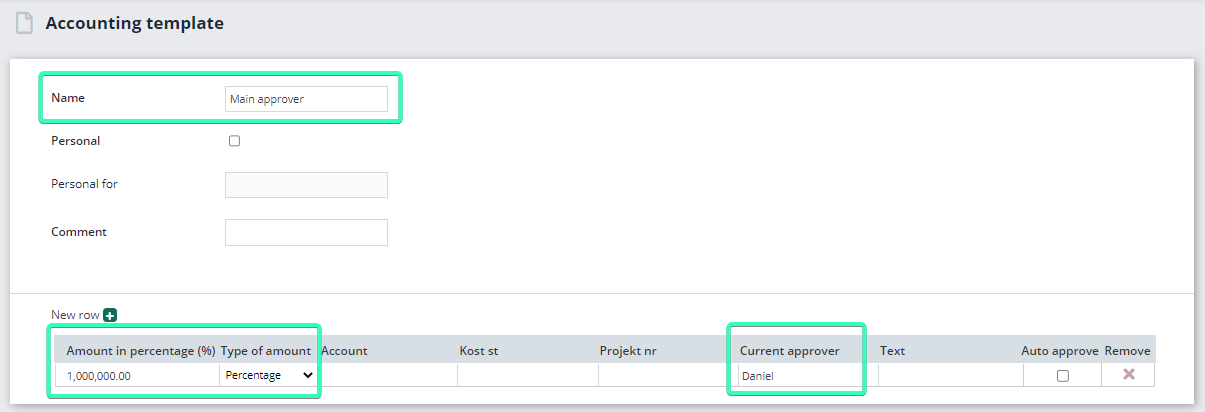
- Click on Administration → Accounting templates → Create new
- Fill in the fields marked in the picture below
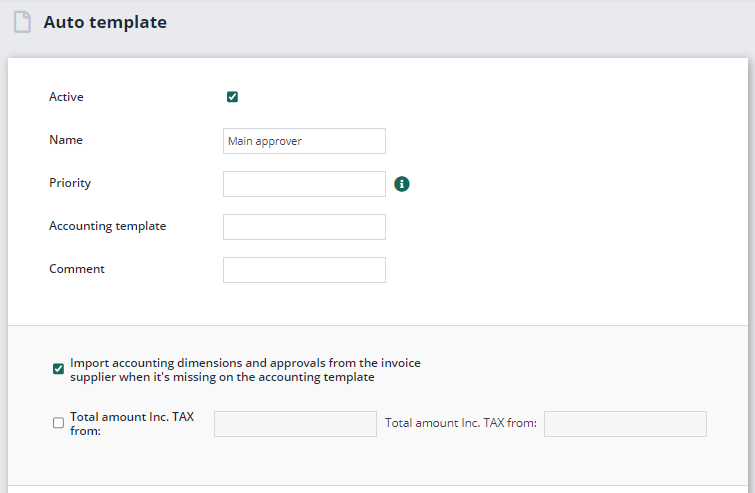
- We will now create an auto template to link our posting template to.
- Click on Administration → Auto template → Create new and retrieve the posting template that was created earlier. Select the checkbox marked in the picture below and finish by clicking on Save.
If you want to split up the amount of an invoice into several lines, there are several ways you can go about it. You can easily change the amount in the Amount field by simply filling in the relevant amount. You can also place the cursor in the Amount field and press the space bar to bring up a mini calculator in the system so you can calculate the amount for the line.
Add posting lines
To split an invoice into several posting lines, proceed as follows:
- Change the amount on the posting line and post as you would normally do.
- There are then two ways to create new lines.
- Press Enter until a new line appears with the remaining amount.
- Click on the + button. The remaining amount will automatically be filled in in the new line.
- Create the number of lines you need and click on OK at the bottom right of the invoice to send the invoice for approval.
One posting line:

