Default approver and posting for a supplier in Rillion One
In Rillion One, you can set up default posting dimensions such as approver and account for a supplier so that they will automatically be proposed on posting lines for invoices from that supplier. This is to avoid needing to enter the same account and the same approver each time an invoice appears from this supplier. Of course, you can also add other dimensions that the organization users such as project or cost centre. If there are exceptions to the default settings, it is easy to change the default settings on the posting line when required.
Default posting dimensions
Go into Administration → Supplier. Click on the supplier you want to set the default posting dimensions for, and then scroll down to the supplier card. At the bottom, you will see the settings under Approval workflow and auto accounting:
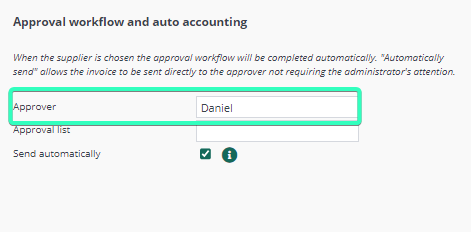
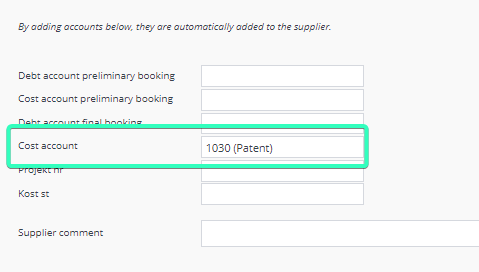
Fill in the dimensions you want to use as the defaults. The above example illustrates how a supplier gets a default approver and a default account. Finish by clicking on Save at bottom right. Now when an invoice comes in from this supplier, the approver and coding will be filled in automatically on the posting line.