Adapt accounting dimensions in Rillion One
Accounting dimensions are integrated with your ERP system. With a dimension we mean for instance; project, cost center, department, location, VAT codes.
In Rillion One: ADMINISTRATION → ORGANIZATION
In Rillion One you have access to your dimensions imported from your ERP system. The number of dimensions depends on which economy system you have. If a dimension is not used, you can hide it in the system. This implies that you do not need to see a column for that dimension on your accounting line. You can choose to change name on a dimension in Rillion One by replacing the current name with something else. You can also change the order on your dimensions. The dimension with the lowest number will be displayed first on your accounting row, next to account. In the example above, dimension 2 will be displayed first:
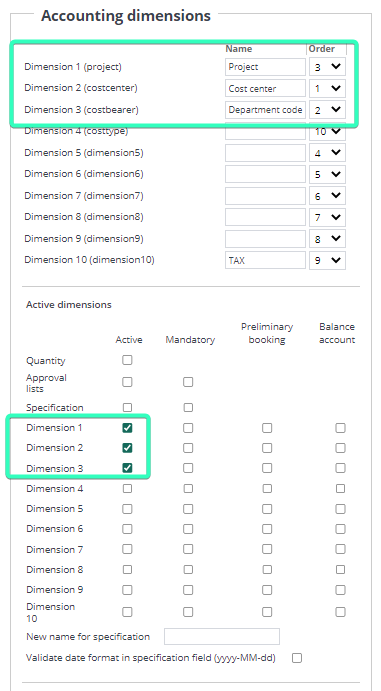

If you want to remove a dimension from Rillion One, you can untick the box that a dimension is active. Press SAVE.
The invoice administrator has access to registers for that active dimension which is imported from your ERP system. Under the header ADMINISTRATION you can find register for project if project is an active dimension and project exist as a code in your ERP system.