Invoices in the status “Unknown supplier”
When invoices arrive in Rillion One, they can end up in different statuses. When they end up in To be verified they have been matched against bank giro, bank account or IBAN in the ERP system's supplier register. In this manual we describe how to handle the invoices in Unknown supplier.
Reasons why invoices may end up in status Unknown supplier
Invoices may end up into the Unknown supplier folder for the following reasons:
- The invoice is sent from a supplier that is not in the supplier register.
- Payment information is missing on the supplier card in the ERP system.
- The payment information on the invoice is shared by several suppliers.
- Payment information has been misinterpreted
Measures
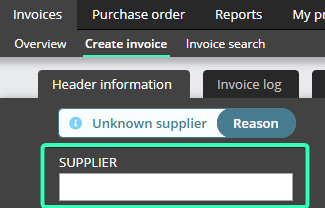
Go to System Administration → Supplier and search on the payment information to see if it depends on a), b) or c). Below are measures for each reason. All measures are terminated with: Fill in the field for Supplier on the invoice (see picture above) and continue with the invoice.
- Set up the supplier in the ERP system. Run import using the button on the invoice overview (the button is missing against some ERP systems; import is instead done in background at regular intervals).
- Update the supplier card in the ERP system. Run import.
- Inside the invoice, look up the supplier the invoice refers to.
- Since all invoices that go through the scanning addresses are OCR interpreted, this means that the words are searchable. Try to select and copy the text of the payment information to see how the system has perceived it.