Restore a deleted invoice
If an invoice has been deleted, is it easy to restore it, even if it has already been recorded in the ERP system. Depending on when (at what stage) the invoice was deleted, different steps will be needed. In this manual, we go through the whole process.
Restore a deleted invoice
Searching among deleted invoices to find the invoice is the first step. You do this under Invoices→Invoice search.
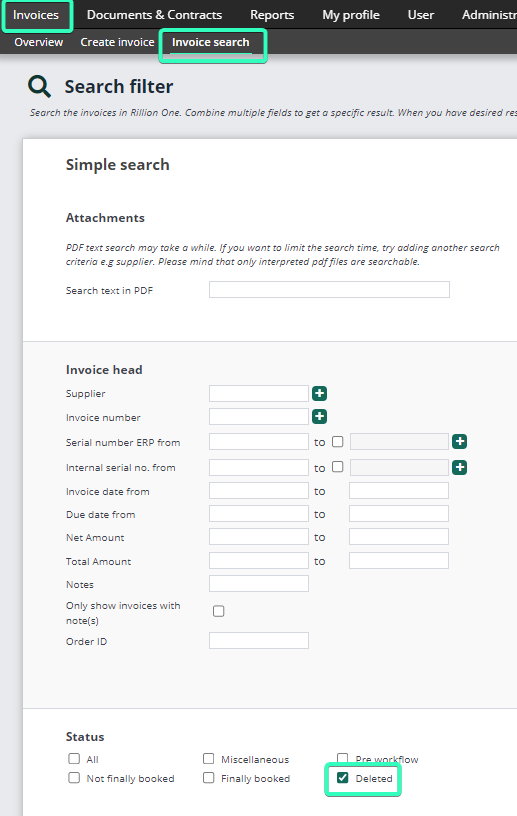
Select Deleted, and then fill in the other information required to find the invoice. When the invoice you want appears in the search results, click on the Edit pen to the far left of the invoice.
Once the invoice is open, the button shown below will be available at the bottom right of the screen. Click on it to Save as a new invoice. It will now be placed in the Review folder and can then be sent out for approval as usual. You can check that the invoice has been restored by looking in the Invoice log for the new invoice.

Restore a deleted invoice already exported to the ERP system
If the invoice has been sent to the ERP system but then for some reason has been deleted in Rillion One, it is possible to restore it. The serial number from the ERP system will need to be filled in manually, and the invoice will be added as Exported regardless of whether the invoice is already paid or not (the status that comes from certain ERP systems).
After clicking on Save as a new invoice, the invoice will be put into the Review folder. The easiest way to archive it now is for the invoice administrator to approve the invoice him/herself. When the invoice is ready for recording, there will be an error, because this invoice already exists in the ERP system. Click on the folder Recording errors and open the invoice.
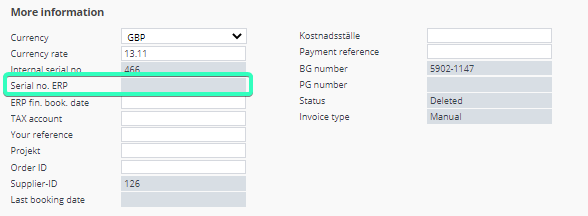
Fill in the serial number that the invoice has in the ERP system, and then click on No registration is necessary.